The Video Will Not Play: What "No Video With Supported Format and MIME Type Found" Means
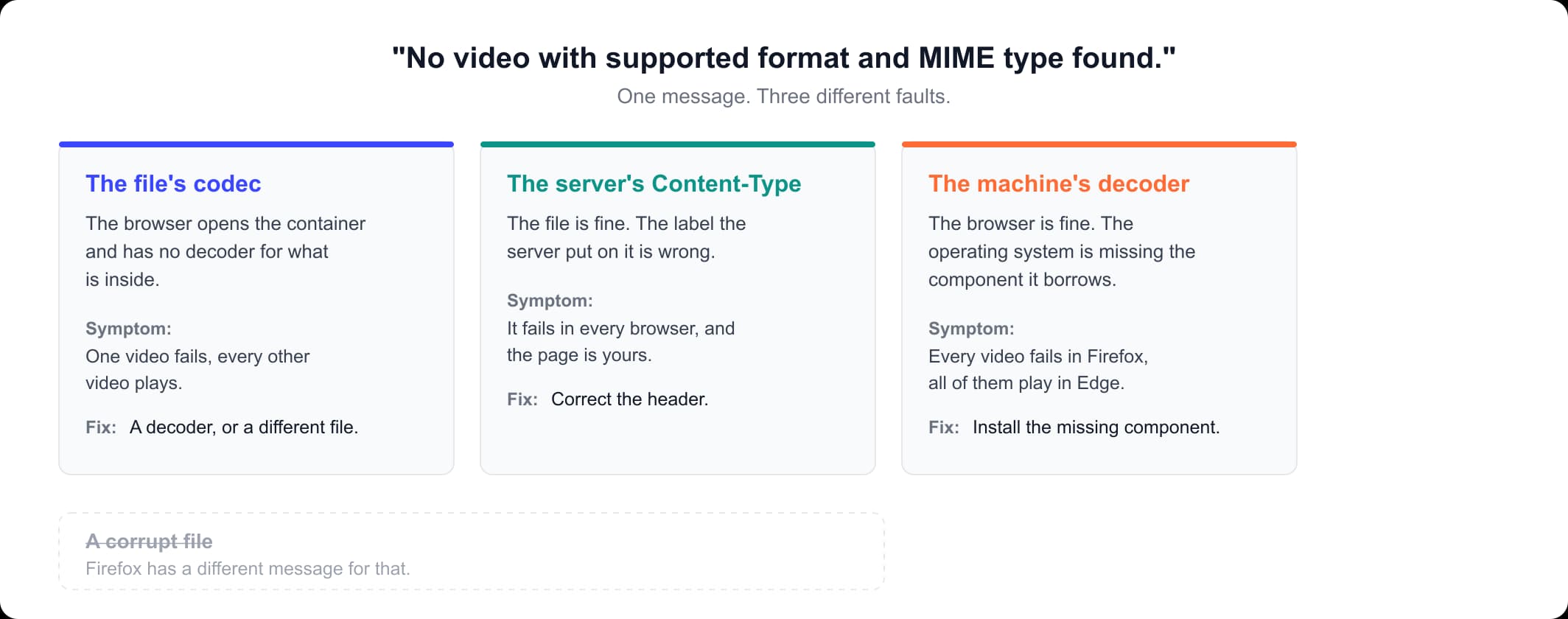
Firefox has a different message for a damaged file, so this one is not about corruption. It points at three things: the codec in the file, the Content-Type the server sent or a missing decoder.
Updated August 31, 2026
What the message means, and the one thing it rules out
Firefox shows "No video with supported format and MIME type found" when a page's <video> element has worked through every source it was given and can use none of them. The one thing it rules out is a damaged file: Firefox has a separate sentence for that, "Video can't be played because the file is corrupt", and you did not get it. Three faults produce the message you did get: the codec inside the file, the Content-Type the server sent or a decoder missing from your computer.
Firefox keeps six playback messages in videocontrols.ftl, the localization file for its video controls. This one appears when the element's networkState is 3, NETWORK_NO_SOURCE, meaning it has run out of candidate sources: either with MediaError code 4, MEDIA_ERR_SRC_NOT_SUPPORTED, or with no MediaError object at all. Code 3, MEDIA_ERR_DECODE, is the corrupt-file branch.
The wording is Firefox's own, but the three faults are the same in every browser, so a gray box in Chrome belongs here too.
| What Firefox says | What it indicates |
|---|---|
| "No video with supported format and MIME type found." | Your message: no usable source |
| "Video format or MIME type is not supported." | Code 4, with a source still selected |
| "Video can't be played because the file is corrupt." | Code 3: the corrupt-file branch |
| "Video loading stopped." | Code 1: the fetch was stopped |
| "Video playback aborted due to a network error." | Code 2: the connection failed |
| "Video playback aborted due to an unknown error." | Any other error code |
The three things the message can mean
The codec inside the file. The extension names the container, the outer box that holds the streams, and a separate codec compressed the picture inside it: H.264 (also called AVC) plays almost everywhere, HEVC (H.265) is its newer, patent-encumbered successor, and VP9 and AV1 are royalty-free. Firefox can open the container and still have no decoder for what is inside it. Our guide to the best video format for the file you already have covers that split. This is the cause when one video fails and the rest of the site plays.
The Content-Type the server sent. A MIME type is the label a server attaches to a file in the Content-Type header, so the browser knows what it has been handed: video/mp4, video/webm, video/ogg. The label is not part of the video, which is why the message names format and MIME type separately. MDN warns that a MIME type set wrong on the server means the video may not show. There is no MIME video format to download or install: only whoever runs the server can change the label. This is the cause when the file is good and every browser refuses it.
The decoder on your machine. Firefox does not carry its own H.264 decoder on Windows. MDN states it plainly: "Firefox support for AVC is dependent upon the operating system's built-in or preinstalled codecs for AVC and its container in order to avoid patent concerns." Without that decoder, every H.264 video on every site fails with this message in Firefox while Edge plays all of them. This is the cause on a Windows edition sold without media components.
Which one you have, in two minutes
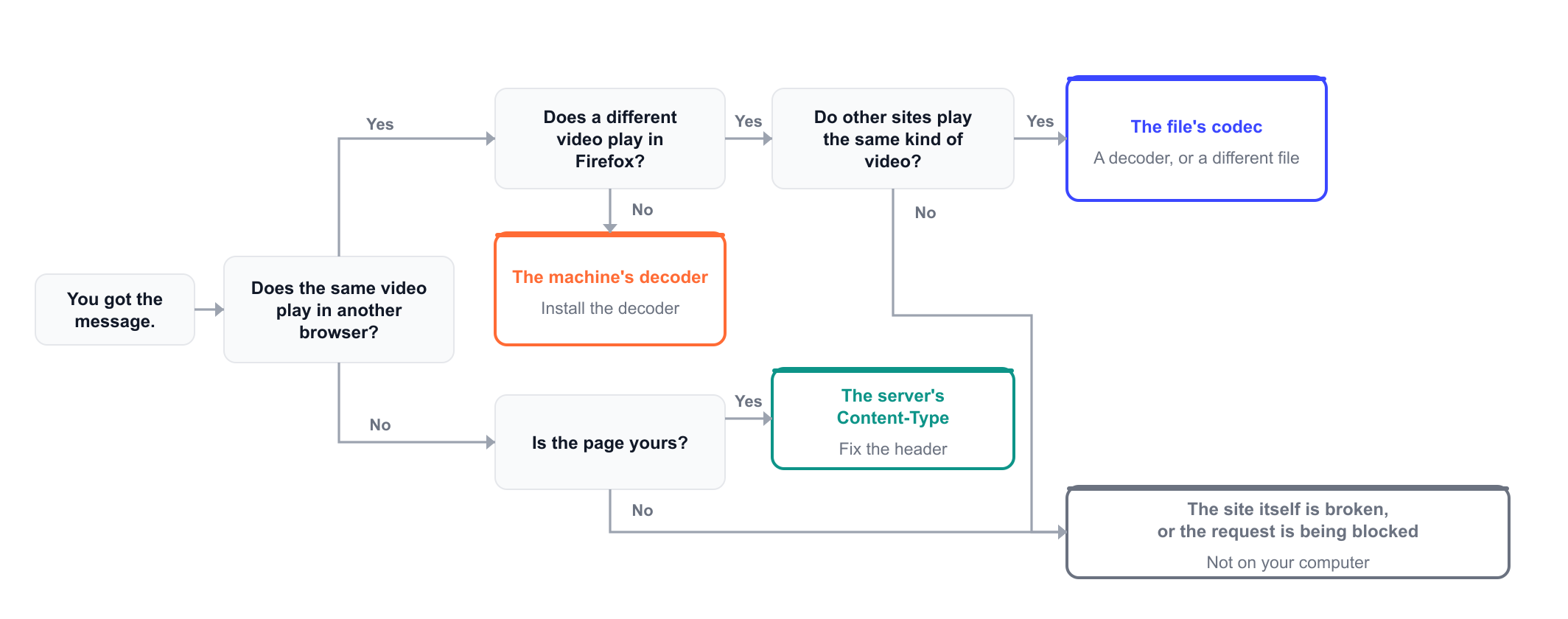
Three checks separate the three causes: the same video in another browser, a different video in Firefox and then whose page it is. "No video with supported format and MIME type found" comes out of all three faults, so the checks tell you which one you are holding and the message never will.
| What you see | What it means | Where to go next |
|---|---|---|
| One video fails, the rest play | The codec in that file | Someone else's video |
| Every video fails, Edge plays them | A decoder your system lacks | Someone else's video |
| One site fails, others are fine | An extension or the site itself | Someone else's video |
| Every browser fails, and the page is yours | The header or the type attribute | Your own page |
| The file is not MP4, WebM or Ogg | The container itself | What a browser will play |
| The wording is one of the other five | A different fault | The message table above |
The second check settles the hardest case. If every H.264 video fails in Firefox, on every site, and the same videos play in Edge, neither the file nor the site is at fault: the operating system is missing the decoder Firefox borrows from it. One video failing points at the file, all of them at the machine.
For the numbers Firefox is acting on, read them from the video element in the browser console. The second command needs a terminal.
const v = document.querySelector('video');
console.log(v.error && v.error.code, v.networkState);
// 4 and 3, or null and 3, both mean this message

curl -I https://example.com/clip.mp4
# read the Content-Type line: an MP4 has to arrive as video/mp4
If it is someone else's video
Open the page in another browser first. When "No video with supported format and MIME type found" appears in Firefox on a page you do not run, that one step decides everything after it, and there is nothing here to convert: the file is not yours.
- One video fails and every other video plays. That file's codec is the problem, usually HEVC inside an MP4. Firefox enables HEVC on Windows from version 134, macOS from 136 and Linux from 137, but only where a decoder is present: on Windows, MDN says software decoding needs an extension the user has to pay for and install. Updating Firefox alone can therefore leave the same video failing. Play that file in a desktop player or in a browser that has the decoder.
- Every video fails in Firefox and the same videos play in Edge or Chrome. The browser is fine and so are the sites: your computer is missing the decoder Firefox borrows from the operating system.
- Your Windows edition has an N in its name. An N edition is sold without Windows Media Player and the related media components. Check with
winver, or in Settings, then System, then About, on the Edition line. If the name contains N, install the Media Feature Pack from Settings, then Apps, then Optional features on Windows 11, or Settings, then Apps, then Apps and features, then Optional features, then Add a feature on Windows 10. Microsoft states a restart is required to finish the installation. A Home or Pro edition already has those components. - One site fails and other sites play the same kind of video. Try the page in a private window with extensions off, and check whether Firefox's tracking protection is blocking the video request. If it still fails, the fault is the site's.
If it is your own page
Two things on your side produce this message on a file that is perfectly good: the header the server sends and the type attribute you wrote. Check the header first: you cannot see it in your markup. A browser loads each <source> in turn and moves to the next when one fails, and MDN documents that the error event fires on the <video> element only after all of the sources have failed. That sequence is where the wording comes from: the element has nothing left to try. MDN's own pattern offers the same video twice.
<video controls width="640">
  <source src="/video/clip.webm" type="video/webm" />
  <source src="/video/clip.mp4" type="video/mp4" />
</video>
A type value can also carry a codecs parameter, in the form video/webm; codecs="vp8, vorbis". Firefox decides from that value whether a source is worth fetching, so a codecs string that does not match the file makes Firefox skip a source it could have played. Leave it out unless you know exactly what is inside. Then request the video URL and read the label the server put on it.
application/octet-streammeans the server has no MIME mapping for that extension and fell back to unlabeled bytes.text/plainis the same fault with a different fallback value.text/htmlmeans the URL is not returning the video at all. It is returning a page, usually a 404 or a login redirect, so fix the path before the headers.
A wrong container needs a different file, not a different header. AVI, MKV and WMV are not web containers: MDN's container index does not list any of them, so no Content-Type value will make a browser play one. An AVI in a <video> tag is the clearest case: our AVI to MP4 converter accepts .avi files and returns MP4. If your page serves WebM alone, our WebM to MP4 converter takes .webm and returns the MP4 to sit beside it. If it serves MP4 alone and you want the WebM second source MDN recommends, our MP4 to WebM converter takes .mp4 and returns WebM. There is no MOV, MKV, WMV or HEVC input here, so re-export the file from the program that made it.
What a browser will actually play
MP4, WebM and Ogg are the three containers MDN's index marks as supported by all browsers, and they are the whole list. Two of them are worth choosing.
| Container | MIME type | Usually holds | Browser support | Use it for |
|---|---|---|---|---|
| MP4 | video/mp4 | H.264 or HEVC, AAC | All browsers | Anything you publish |
| WebM | video/webm | VP9 or AV1, Opus | All browsers | A second source beside MP4 |
| Ogg | video/ogg | Theora, Vorbis | All browsers, in name | Nothing new |
| MOV | video/quicktime | H.264, HEVC or ProRes | Older Safari only | Apple editing, not the web |
| MKV | Not in MDN's index | Almost any codec | Desktop players | Local libraries |
| AVI | Not in MDN's index | Whatever was put in | Desktop players | Convert before publishing |
Ogg is in the table because MDN marks it "All browsers", and MDN attaches its own warning: it "has never gained the wide support needed to make it a good first choice" and "you are typically better off using WebM". Theora, the codec Ogg carries, stopped working in Chrome after 121 and in Firefox after 126.
The codec inside decides as much as the container. H.264 plays everywhere, though Firefox takes its decoder from the operating system, and HEVC is the one to check when a single MP4 fails and the others on the page play. VP9 works in every version of Chrome, Edge, Firefox, Opera and Safari. AV1 works in Firefox from version 67 and on Safari only on devices with a hardware decoder.
Fixes you will be told to try that no longer work
- Install Adobe Flash Player. Adobe stopped supporting Flash Player after 31 December 2020 and blocked Flash content from running in it from 12 January 2021. An HTML
<video>element has never used Flash. - Switch on
media.directshow.enabledinabout:config. That preference has no entry in Firefox's static preference list, so there is nothing to switch on. - Download the Media Feature Pack as a package. Microsoft's current instruction is Settings, then Apps, then Optional features, with no separate download and no KB number, and it applies only to editions whose name contains N.
- Repair the video file. Firefox uses "Video can't be played because the file is corrupt" for a damaged file, from a different error code. This message is not a corruption diagnosis.
- Clear your cache and cookies. One narrow case earns it: a cached response with the wrong
Content-Typekeeps being refused after the server is fixed.
How to find out which of the three causes you have
Five steps between the message and the fix.
Read the message you actually got
Compare the wording against Firefox's six playback messages. A different sentence means a different cause, and "Video can't be played because the file is corrupt" is not this message.
Open the same video in another browser
Edge, Chrome or Safari. If the video plays there, the file is fine, and the problem is either in Firefox's access to a decoder or on your computer.
Open a different video in Firefox
Any video on any other site. If every video fails in Firefox and the same videos play elsewhere, your operating system is missing the decoder Firefox borrows from it.
If the page is yours, look at what the server sent
Request the video URL with curl -I and read the Content-Type line, then check the type attribute on each source element in your markup.
Act on the one cause that survived
Install the missing decoder, correct the header or replace the file. One of the three checks failed, so one of the three actions is the one worth taking.
Frequently asked questions
Read more articles

The Best Video Format for the File You Already Have

The YouTube Bitrate to Set Before You Export

The Shape to Export for YouTube, and How the Player Adapts