Downloading a Song From YouTube: Offline Play or a File You Keep
There are three ways to get a song out of YouTube, and they do not end in the same place. Which one you want depends on whether you only need to play the track or you need to move it.
Updated September 4, 2026
The short answer: three routes, and only two of them give you a file
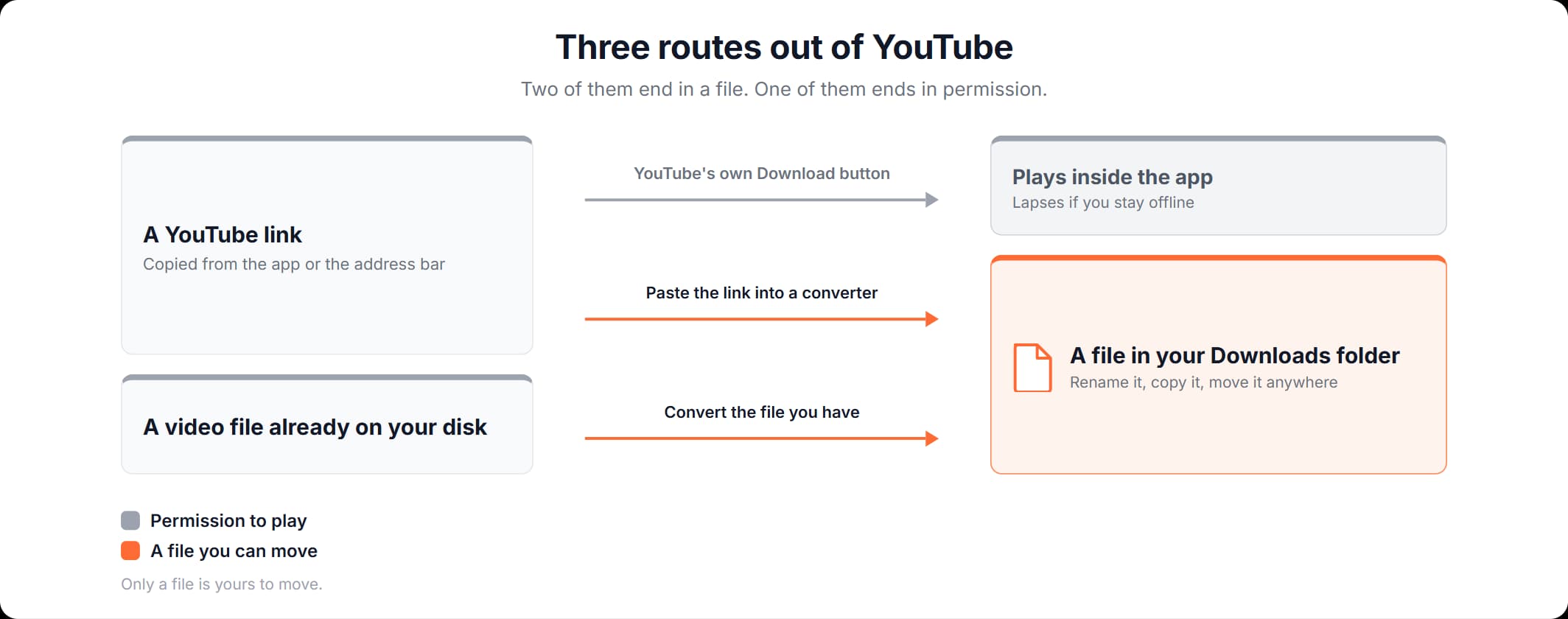
Yes, you can download music from YouTube. There are three routes, and only two of them leave you with a file you can move. Everything else about how to download music from YouTube follows from that: pick the route by what you need at the end of it. YouTube's own Download button gives you permission to play a track offline inside the YouTube app, and that permission lapses if the device stays off the internet. A converter in your browser gives back an MP3 that sits in your Downloads folder like any other file.
How to download a song from YouTube depends on what you plan to do with it. If you want it on a plane, YouTube's own download is built for exactly that. If you want it in a music library or on a USB stick for the car, you need a file. The best way to download music from YouTube is the route that ends where you need it to. Route one is the one most people try first.
| Route | What it leaves you with | What it costs you |
|---|---|---|
| YouTube's own Download button, in YouTube or in YouTube Music | Permission to play the track offline inside that app. No file you can find, rename or copy. | A paid Premium membership and reconnecting to the internet before the download lapses. |
| Turning the YouTube link into an audio file you keep | An MP3 in your browser's Downloads folder, which behaves like every other file on the device. | Nothing to install and no account. One link at a time. |
| Converting a video file already on your disk into an audio file | The same kind of file, made from the video you already have rather than from a link. | You need the video file first. |
Route one: YouTube's own download and the box it stays in
YouTube's own download needs a paid membership and keeps what it downloads inside the app. YouTube's help page on offline viewing says: "If YouTube Premium is available in your location, you can download and watch videos on your mobile device." The same page describes how to find a download: sign in to the YouTube app, tap your profile picture, then select the Downloads playlist in your Library under Recents. There is no folder anywhere in that sequence.
How to download music on YouTube, in YouTube's own sense of downloading, is a paid feature, and YouTube has two apps that offer it. The rule is the same in both apps. The number of days is not.
- YouTube, the video app. "Downloaded videos can be played offline for up to 29 days. After that, you'll need to reconnect your device to the internet," says YouTube's help page Watch videos offline with YouTube Premium. It also says that in some countries and regions content can be played for up to 48 hours without an internet connection.
- YouTube Music, the separate music app with its own Premium tier. How to download music from YouTube Music is described on YouTube Music's own help page: "If you're a YouTube Music Premium member, you can enjoy content offline by downloading songs, videos, and podcasts to your mobile device," and "You'll need to reconnect to the internet at least once every 30 days to maintain your downloads." The same page says that how much you can download depends on the free space on your device.
The 29 days belong to YouTube and the 30 days belong to YouTube Music. Neither help page names a folder, a file path or a way to move a download off the device. Both describe a list inside an app. So this route answers "I want this track on the plane tomorrow" and it does not answer "I want this track on the USB stick in my car." If what you want is how to download music from YouTube without Premium, neither app has a setting for it. The browser route below works without a membership.
Route two: a link, a browser and an MP3 you can move
Paste a YouTube link on a converter page, switch the result to the Audio tab, pick a row and save it. What arrives is an MP3 in your browser's Downloads folder, which is an ordinary file you can rename, copy and move. Nothing is installed and there is no account step.
This is the route people mean by how to download music off YouTube: the video stays where it is, and a copy of its sound arrives on your device. It costs nothing and needs no membership, which is the answer to how to download free music from YouTube. How to download a YouTube song this way takes five steps, one track at a time.
- Copy the link to the track. On a computer, take it from the browser's address bar. In the YouTube app, tap Share, then Copy link. Short
youtu.belinks are accepted as well as fullyoutube.comones. - Paste it into the field on our YouTube to MP3 page and press Convert. The field accepts a full video link or a Shorts link. You do not sign in and you do not install anything.
- Read the result. The page comes back with the video's thumbnail, its title and its duration. Underneath them are two tabs: Video and Audio.
- Switch to the Audio tab. The result opens on Video, so you have to switch. The Audio tab lists the audio versions available for that link, one per row, with a file type and a quality label on each row. Four rows are shown at first. If the list is longer, Show More opens the rest.
- Pick a row and press Download. The file is saved wherever your browser puts downloads. There is nothing left to do in another program.
When a link comes back with nothing, the cause is usually the video rather than our page. Four causes cover most of it: the video is private, members-only, age-restricted or not available in your country. Open the same link in a browser tab where you are signed out of YouTube. If the video will not play for you there, a converter cannot reach it either.
How to download music from YouTube to a computer
To download music from YouTube to a computer, use the same link route in a desktop browser. The file arrives in whatever folder that browser saves downloads to, and from there it is a file like any other. On Windows that folder is normally Downloads inside your user folder. On a Mac it is Downloads in the Finder sidebar.
Downloading music from YouTube to a PC and downloading it to a Mac take the same steps, because none of the work happens on your machine: the browser sends the link and saves the file that comes back. Nothing is installed on either one.
That folder is the point of the whole exercise. You can drag a file sitting in it into a music library, copy it onto a USB stick for the car stereo or keep it on a drive with the rest of your music. Permission to play inside an app does none of those things. So if the question is whether you can download YouTube music to your computer, look at which route ends in a folder: the browser route does and a Premium membership does not.
A phone is a different situation: both the folder and the way you play the file change. There is a section on it below.
What you get is one file, not a music library
The link route returns one file per link. There is no playlist or album input on our page: one link in, one result out. An album means repeating that for each track. The .mp3 at the end of the filename names the container: the box the sound is packed in, rather than the sound inside it. Our guide to the box a file is in and what is inside it works through that difference.
The filename comes from the video title, so it carries whatever the uploader typed there. Whether a music player then shows a clean artist and title depends on the file's ID3 tags, the block of text inside an MP3 that players read for artist, title and album. When a library files a track in the wrong place, the tags are what to edit, which is what a tag editor is for.
The audio from a music video still has the intro, the crowd and the outro in it. If the music video itself is what you want, how to download music videos from YouTube is a different job, and our YouTube video downloader is the page for it. YouTube compressed that audio once when the video was uploaded, and whatever writes your MP3 compresses it a second time, which is called re-encoding. What that costs is covered in our guide to what came back and which format to keep it in.
If you are doing this on a phone
On a phone you use the same page and the same Audio tab. Two things change: where the file is saved and how you reach it afterwards. The browser and the operating system decide both. On an iPhone the file goes into a Downloads folder you reach through the Files app. On Android it goes to the device's own download location. Our guide to doing this on an iPhone, an iPad or an Android phone covers what to do from there.
Is it legal to download music from YouTube?
Whether it is legal to download music from YouTube is not something this page can settle for you. What we can quote is YouTube's Terms of Service, whose Permissions and Restrictions list says you are not allowed to:
access, reproduce, download, distribute, transmit, broadcast, display, sell, license, alter, modify or otherwise use any part of the Service or any Content except: (a) as expressly authorized by the Service; or (b) with prior written permission from YouTube and, if applicable, the respective rights holders
The same Terms say, separately, "You may view or listen to Content for your personal, non-commercial use." Read together, they say that listening is permitted for personal, non-commercial use and that downloading is not, unless the service itself authorizes it or a rights holder has agreed in writing. YouTube's own paid download is the route the service expressly authorizes, and it is the only one YouTube documents.
Those Terms are an agreement between you and YouTube rather than a statute, so breaking them is a matter between you and YouTube. Copyright is a separate question, and it belongs to whoever owns the recording. Is it illegal to download music from YouTube? That question moves from the agreement to the copyright law of the country you are in, and that law is not the same everywhere. We cannot tell you what yours allows.
What will not help
Four moves look worth trying next, and none of them changes the outcome.
- Waiting for a Premium download to appear in a file manager. YouTube's help page describes a Downloads playlist inside the app and documents no folder, no file path and no way to move the file. There is nothing published to look for.
- Signing in with your Google account because a page offers to "download your music." No route on this page needs your account. The browser route takes a link and nothing else. Anything that asks for a Google password to fetch a public video wants more than the job requires.
- Installing an app from an APK file on a forum's advice. The threads that recommend it are often old enough to call the paid tier YouTube Red, and a sideloaded app runs with your phone's permissions rather than the permissions of a browser tab.
- Searching for the song by name instead of using the link you already have. Those searches lead to app stores and licensing catalogs, while the link in your other tab points to the exact track you want.
How to download music from YouTube and keep the file
Four steps from a link in your address bar to an MP3 in your Downloads folder.
Copy the link to the track
On a computer, take it from the address bar. In the YouTube app, tap Share, then Copy link. Short youtu.be links are accepted as well as full youtube.com ones.
Paste it in and press Convert
The field accepts a full video link or a Shorts link. Nothing is installed and there is no account step.
Switch to the Audio tab
The result opens on Video, with the thumbnail, title and duration above the tabs. The Audio tab lists the audio versions available for that link, with a file type and a quality label on each row.
Pick a row and save it
The file is saved in your browser's Downloads folder, where it is an ordinary file you can move, drag into a music library or copy onto a USB stick.
Frequently asked questions
Read more articles
What You Actually Get When You Download Audio From a YouTube Video
No Computer Needed: Download Music From YouTube to Your iPhone
Why Your TikTok Video Looks Soft, and How to Measure the Quality Loss